Anchored Box with Message
Using CSS anchor positioning is still fairly new, but browser support is looking good enough (this was tested on Firefox and Edge).
The biggest hurdle I was facing was making the anchor the parent element and the target a child. This will work for either parent -> child or sibling anchoring.
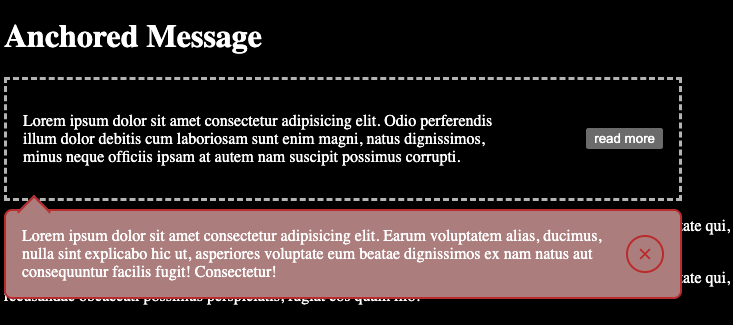
Requirements
- Use
anchor-nameandposition-anchorto attach box to target - Allow parent to be the anchor
- Open and close button: only inserts and removes text with Javascript. CSS handles showing and hiding the elements
- Animate in and out
- Style a gap with arrow pointing to target
Live Demo
https://assets.tawtaw.site/tawtaw/anchored-message/
HTML, CSS, JS
<!doctype html>
<html lang="en">
  <head>
    <meta charset="UTF-8" />
    <meta name="viewport" content="width=device-width, initial-scale=1.0" />
    <title>Anchored Message</title>
    <style>
      .row {
        position: relative;
        border: dashed 3px rgb(179, 179, 179);
        padding: 1rem;
        display: flex;
        max-width: 40rem;
        justify-content: space-between;
        anchor-name: --my-anchor;
        /* transform: translateX(20px); */

        & > p {
          max-width: 60ch;
        }

        & > .actions {
          display: grid;
          place-items: center;
        }
      }

      .anchored-box {
        --bg: rgb(171, 125, 125);
        --border: rgb(183, 42, 42);
        --arrow: 22px;
        --gap: 0.5rem;
        color: white;

        position: fixed;
        align-items: center;
        display: flex;
        gap: 1rem;
        background: var(--bg);
        border: 2px solid var(--border);
        border-radius: 8px;
        box-sizing: border-box;
        inline-size: min(anchor-size(width), 100%);
        padding-inline: 1rem;
        position-anchor: --my-anchor;
        position-try-fallbacks: --bottom-right, --bottom-left;
        top: calc(anchor(bottom) + var(--gap));
        left: anchor(left);

        transition-property: opacity, transform, display, visibility;
        transition-duration: 220ms;
        transition-timing-function: ease-out;
        transition-behavior: allow-discrete;
      }

      .anchored-box button.close {
        margin-left: auto;
        color: var(--border);
        display: grid;
        place-items: center;
        background-color: transparent;
        border: solid 2px currentColor;
        border-radius: 50%;
        padding: 0.3rem;
      }

      .anchored-box:has(.message:empty) {
        visibility: hidden;
        opacity: 0.2;
        transform: translateY(14px);
        pointer-events: none;
      }

      .anchored-box:has(.message:not(:empty)) {
        transform: translateY(0);
        opacity: 1;
        pointer-events: auto;

        @starting-style {
          transform: translateY(20px);
          opacity: 0;
        }
      }

      .anchored-box button.close:hover {
        border-color: currentColor;
        color: currentColor;
      }
      .anchored-box button.close:active {
        border-color: red;
        color: red;
      }

      .anchored-box::after {
        content: "";
        position: absolute;
        top: calc(var(--arrow) / -2);
        left: calc(anchor(left) - (var(--arrow) / 2));

        width: var(--arrow);
        height: var(--arrow);
        transform: rotate(45deg);
        background: var(--bg);
        border-left: 2px solid var(--border);
        border-top: 2px solid var(--border);
        z-index: 0;
      }

      .btn {
        /* anchor-name: --my-anchor; */
        transition: all 1s;
        /* transform: translateX(100px); */
      }

      @position-try --bottom-right {
        inset: unset;
        top: calc(anchor(bottom) + 0.5rem);
        left: calc(anchor(left));
      }
      @position-try --bottom-left {
        inset: unset;
        top: calc(anchor(bottom) + 0.5rem);
        right: calc(anchor(right));
      }
    </style>
  </head>
  <body>
    <h1>Anchored Message</h1>
    <div class="row">
      <p>
        Lorem ipsum dolor sit amet consectetur adipisicing elit. Odio
        perferendis illum dolor debitis cum laboriosam sunt enim magni, natus
        dignissimos, minus neque officiis ipsam at autem nam suscipit possimus
        corrupti.
      </p>
      <div class="actions">
        <button
          class="btn"
          onclick="
            setErrorMessage(
              'Lorem ipsum dolor sit amet consectetur adipisicing elit. Earum voluptatem alias, ducimus, nulla sint explicabo hic ut, asperiores voluptate eum beatae dignissimos ex nam natus aut consequuntur facilis fugit! Consectetur!',
            )
          "
        >
          read more
        </button>
      </div>
      <div class="anchored-box">
        <p class="message" id="anchored-box"></p>
        <button class="close" onclick="setErrorMessage('')">
          <svg
            width="24px"
            height="24px"
            viewBox="0 0 24 24"
            fill="none"
            xmlns="http://www.w3.org/2000/svg"
          >
            <path
              d="M6.99486 7.00636C6.60433 7.39689 6.60433 8.03005 6.99486 8.42058L10.58 12.0057L6.99486 15.5909C6.60433 15.9814 6.60433 16.6146 6.99486 17.0051C7.38538 17.3956 8.01855 17.3956 8.40907 17.0051L11.9942 13.4199L15.5794 17.0051C15.9699 17.3956 16.6031 17.3956 16.9936 17.0051C17.3841 16.6146 17.3841 15.9814 16.9936 15.5909L13.4084 12.0057L16.9936 8.42059C17.3841 8.03007 17.3841 7.3969 16.9936 7.00638C16.603 6.61585 15.9699 6.61585 15.5794 7.00638L11.9942 10.5915L8.40907 7.00636C8.01855 6.61584 7.38538 6.61584 6.99486 7.00636Z"
              fill="currentColor"
            />
          </svg>
        </button>
      </div>
    </div>
    <p>
      Lorem ipsum dolor sit amet, consectetur adipisicing elit. Expedita facere
      ex autem maxime veniam voluptate qui, tempora nam, et soluta quas optio
      recusandae obcaecati possimus perspiciatis, fugiat eos quam illo!
    </p>
    <p>
      Lorem ipsum dolor sit amet, consectetur adipisicing elit. Expedita facere
      ex autem maxime veniam voluptate qui, tempora nam, et soluta quas optio
      recusandae obcaecati possimus perspiciatis, fugiat eos quam illo!
    </p>

    <h2>Scripts and Styles</h2>
    <script>
      const anchoredBox = document.getElementById("anchored-box");
      console.log(anchoredBox);
      function setErrorMessage(message) {
        anchoredBox.textContent = message;
      }
    </script>
  </body>
</html>