Local RAG Library Documentation and Source Code Repos
Months of copy and pasting code snippets from my IDE to multiple chat browser windows, auditing, and copying back into the IDE. God forbid i start a new chat and have to re explain the context (tools, libraries, project description) all over again.
While sites like ChatGPT, Claude, Gemini now can save and reference across different chat instances, I'd rather spend a day beefing up my local dev environment.
I've already experimented with Ollama with Docker Compose in my https://github.com/wchorski/rag-chat-docs project. Installing and making use of LLMs is trivial now. With the help of https://docs.openwebui.com/ I'm able to get that same basic experience from the Big Tech giants but from the comfort of my Home Lab 🏠
Installation
Prerequisites
- https://ollama.com/ (docker version as well, can combine into same
compose.ymlfile) - https://docs.openwebui.com/ v0.9.6 (I use the docker version)
- https://github.com/open-webui/oikb (CLI tool)
API Key
- https://chat.lan/admin/users/groups
-
- New Group "API Users"
- Permissions > Features Permissions > API Keys "checked"
- Users > DESIRED_USER "checked"
-
- Top Level Settings > Account > API Key "generate"
Utilizing Knowledge Bases
At first I didn't bother digging into knowledge bases. I was using the VS Code extension Continue to crawl my local source code and provide contextual answers (all powered by the self hosted Ollama LLMs). As of today they have dropped support for non-locally ran models (if the model isn't found on localhost it ain't local). There was also the missing ingredients of referencing other files other than my local ones.
Head to your Open-WebUi to start inserting your references https://chat.lan/workspace/knowledge
Add Source-Code
First I wanted to add the source code of the project I was working
-
- New Knowlege
- name "My Project Repo"
- grab the kb-id from url
https://chat.lan/workspace/knowledge/489f41b2-3brb-4677-8992-dbqeddk59869
cd /Volumes/storage/MY_PROJECT_REPO
pip install oikb
## i don't use SSL because I didn't want to deal with the headache. Let me know if you find a way to allow SSL
oikb config set url http://HOMELAB_SERVER.lan:3000
oikb config set token ****
oikb init
sources:
  - name: MY_PROJECT_REPO
    source: /Volumes/storage/MY_PROJECT_REPO
    kb-id: 489f41b2-3brb-4677-8992-dbqeddk59869 # from Open WebUI KB settings
    filter:
      max-size: 1mb # skip binaries/large files
      exclude:
        - "node_modules/**"
        - ".git/**"
        - "dist/**"
        - "db/**"
        - ".astro/**"
        - "playwright-report/**"
        - "build/**"
        - ".env*"
        - "**/*.lock"
        - "**/*.png"
        - "**/*.jpg"
        - "**/*.svg"
        - "**/*.ico"
        - "coverage/**"
        - ".next/**"
        - "*.min.js"
        - "*.min.css"
## Check to see what's getting pushed before actually commiting. Good for auditing any unwanted files.
oikb sync --dry-run

## if all looks good
oikb sync
You should know see those files reflected in the Knowledge base
Add in Documentation from Github Repos
First thought was to import the source code of the libraries and frameworks I wanted to scrape knowledge from. You do not want this. What you do want is the official documentation that outlines basic usage, advanced concepts, and example snippets.
Usually these files can be found inside as a mono repo or as a seperate repository. I'll show you 2 examples that show both.
- Astro Docs (separate repo)
- HTMX Docs (same as source code)
adding them to .oikb.yaml
## used for daemon command
defaults:
  url: http://HOMELAB_SERVER.lan:3000 # your Open WebUI URL
  api-key: sk-****
  no-verify-ssl: true

sources:
  - name: event-horizion
    source: /Volumes/edata/cloutdrive/webdev/event-horizon
    kb-id: 439f41b2-3beb-4677-8962-dbeedd959869 # from Open WebUI KB settings
    filter:
      max-size: 1mb # skip binaries/large files
      exclude:
        - "node_modules/**"
        - ".git/**"
        - "dist/**"
        - "db/**"
        - ".astro/**"
        - "playwright-report/**"
        - "build/**"
        - ".env*"
        - "**/*.lock"
        - "**/*.png"
        - "**/*.jpg"
        - "**/*.svg"
        - "**/*.ico"
        - "coverage/**"
        - ".next/**"
        - "*.min.js"
        - "*.min.css"

  - name: astro-docs
    source: github:withastro/astro
    kb-id: a5e38535-9325-481d-a3cd-e21946ac3588
    filter:
      include:
        - "src/content/docs/en/**/*.mdx"
        - "src/content/docs/en/**/*.md"
      exclude:
        - "src/content/docs/en/**/*.png"
        - "src/content/docs/en/**/*.jpg"
        - "src/content/docs/en/**/*.svg"

  - name: htmx-docs
    source: github:bigskysoftware/htmx
    kb-id: 73d78375-9a7a-4922-99d2-b1beeefe486d
    filter:
      include:
        - "www/content/**/*.mdx"
        - "www/content/**/*.md"
      exclude:
        - "www/content/**/*.png"
        - "www/content/**/*.jpg"
        - "www/content/**/*.svg"

  # TODO make drizzle happen
  # - name: drizzle-docs
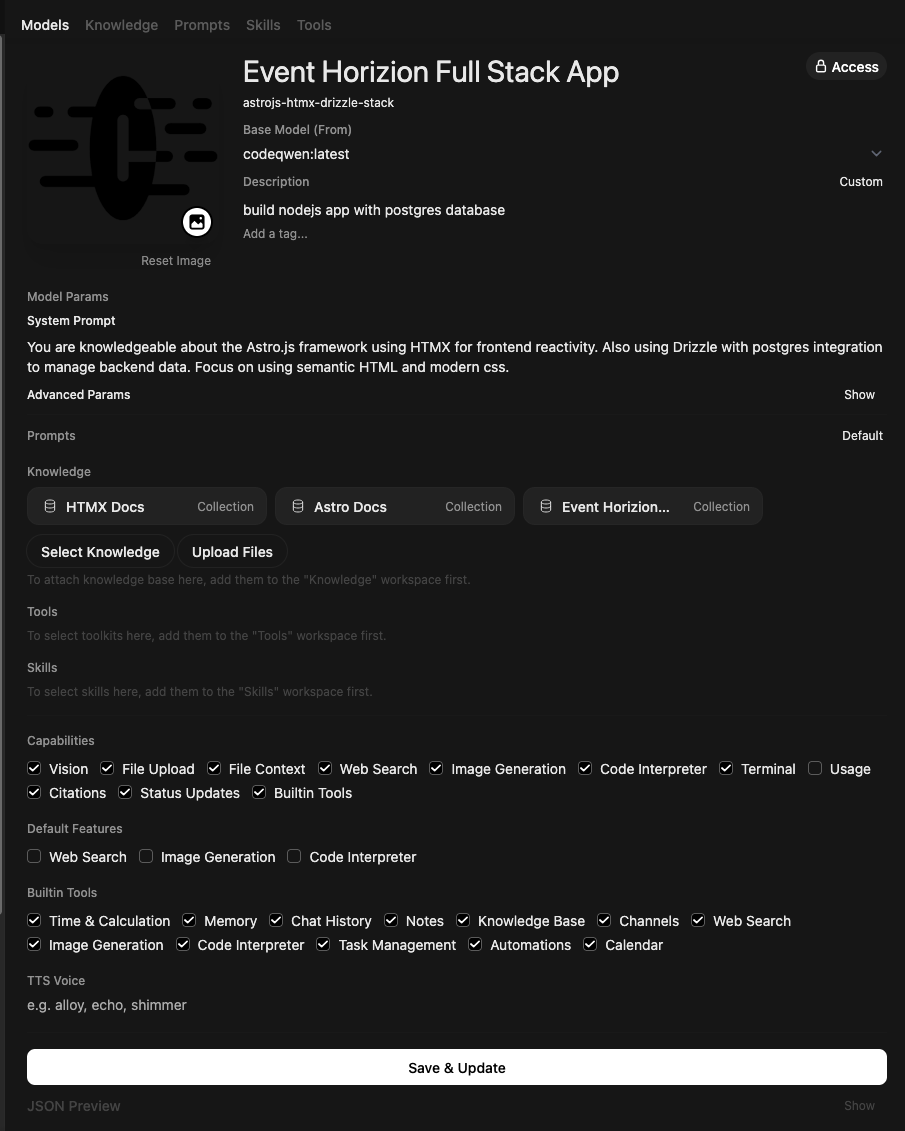
Tie the KBs into a Workspace
https://chat.lan/workspace/models
-
- New Model
- Select Base Model
- Select Knowledge
- MY PROJECT (Source Code)
- Astro Docs
- HTMX Docs
- etc...
result
In Action
Now you have a fully context aware chat bot and can reference certain KBs by using the # prefix.
For now I'm just running oikb sync anytime i want to refresh the knowledge bases. I'll look into using watch or daemon to automate this process.